10 min read
From One Hot Laptop to a Three-Machine Desk
Hardware, Mini PC, Linux, Homelab, Tailscale
TL;DR: My 2019 IdeaPad 5 throttled itself into a stutter whenever I tried to code during a video call. Fresh thermal paste and a fan clean genuinely helped, but a repaste can't fix a four-core chip being five years behind, so I bought a GMKtec mini PC (Ryzen 7 8845HS) anyway. It's now the brain of a three-machine desk: the mini PC, the retired IdeaPad as a second screen, and a Surface Pro for going portable, all sharing one keyboard and mouse. Tailscale handles reaching the machines from anywhere; Deskflow handles gliding between them at the desk.
For a while my main machine was a Lenovo IdeaPad 5 with an i7-1065G7. It was fine when I bought it. The problem showed up later, and it showed up in the worst possible situation: I would be on a video call and trying to write code at the same time, and the whole thing would fall apart. Fans at full speed, and the CPU cores throttling in slow waves. Type a line, wait, type a line, wait. On a 4-core chip from 2019, a Zoom call plus VS Code plus a browser was already too much.
So I did the obvious thing first. I opened it up.
Repasting the IdeaPad
The paste on this thing was years old and had gone dry, which is exactly what you would expect after that long. I cleaned out the fan and the vents, both of which had collected the usual carpet of dust, and put fresh paste on the CPU.
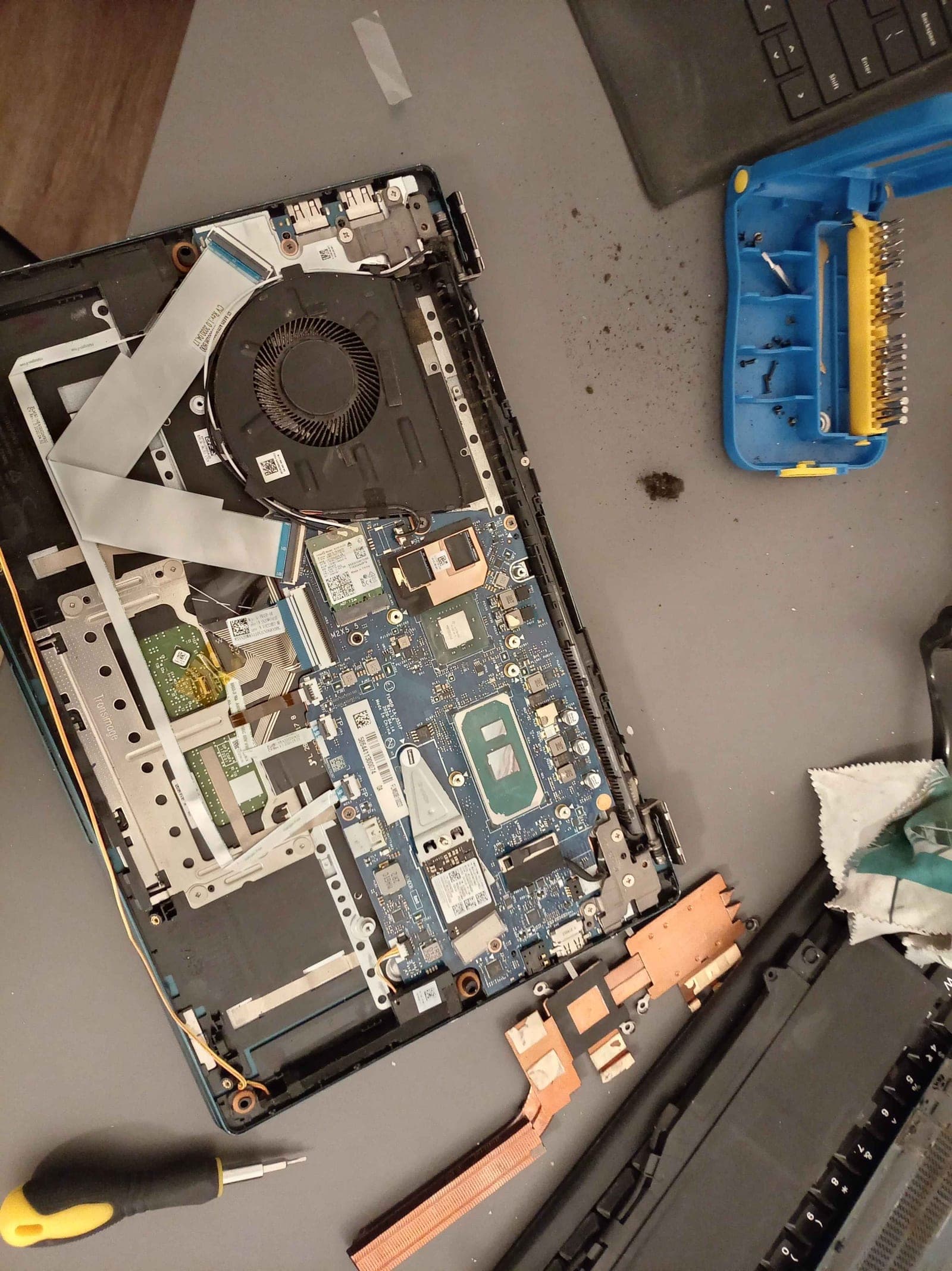
This is the machine with the bottom off and the heatsink already lifted. You can see the single fan up top, the copper pipe running down to the CPU, and the general amount of dust that builds up over a few years of daily use. Nothing exotic here. It is a standard U-series cooling solution doing its best in a thin chassis.
The repaste helped. It genuinely did. Idle temperatures dropped, the fan stopped screaming during normal work, and the sinusoidal throttling during calls mostly went away. If your older laptop runs hot, do this before you do anything else. It is cheap and it works.
But "better" is not the same as "enough." The repaste fixed the thermal problem. It did not fix the fact that this is a 4-core chip from 2019. There is only so much cooling can do for you when the silicon itself is the bottleneck. And on top of that, the hinges on this laptop are damaged and not really fixable, which meant it had already quietly become a desk-only machine. A portable laptop that can't move is just a desktop with a bad monitor attached.
So I bought a mini PC.
The mini PC
I went with a GMKtec NucBox K8 Plus. Ryzen 7 8845HS, 8 cores and 16 threads, 32GB of DDR5, 1TB NVMe, and the Radeon 780M iGPU. It runs the CPU at a full 54W, which a thin laptop with the same chip would never let you sustain.
The difference is not subtle. Here is the honest comparison that made me stop hesitating:
- IdeaPad, i7-1065G7: 4 cores, 8 threads, tops out around 3.9 GHz, and that is on a good day with fresh paste.
- K8 Plus, Ryzen 7 8845HS: 8 cores, 16 threads, boosts to 5.1 GHz, and holds it because it is not fighting a 15W thermal envelope.
The clearest way to see it: I opened Core Temp on the K8 Plus while running Discord, a handful of browser tabs, and VS Code. The cores sat at 40 to 45°C, barely awake. The same workload on the IdeaPad used to push it to the mid-70s and set the fan off. One machine is working, the other is idling, and they are doing the exact same thing.
The 780M is a real bonus too. It is genuinely the best integrated GPU I have used, and it will happily run Rocket League at high framerates at 1080p, which the IdeaPad could never dream of.
It pulls its weight on real work, not just games. A while back I needed to open a password-protected Excel file, which really comes down to brute-forcing a fixed 40-bit key. On the K8's Ryzen 7 8845HS (well, its Radeon 780M) the search ran at 200 to 700 MH/s; the IdeaPad's 10th-gen i7-1065G7 managed about 5 MH/s at the exact same job. That is somewhere between 40 and 140 times faster on identical work. I won't spill the whole night here. Why these files are crackable at all, and the small tool that finally finished mine, is its own story.
Why a mini PC and not a used laptop
Before landing here I spent a long time looking at second-hand laptops. That is the obvious move when you want performance on a budget, and I looked at a lot of them: ThinkPads, an XPS, older Dell gaming machines, the lot. What made me stop was doing the actual math on what the money buys.
The K8 Plus was around 700 euros, brand new, with 32GB of RAM and a 1TB SSD, plus the full port selection GMKtec lists on their site: dual USB4, dual 2.5G ethernet, OCuLink, HDMI 2.1, DisplayPort 2.1. That configuration, first-hand, at that price, is not something the laptop market offers. Every used laptop I found near 700 euros came with 16GB of RAM and a 512GB drive, and RAM prices right now are high enough that closing that gap yourself costs real money. A used machine that actually matched these specs was consistently more expensive, and it would still be a used machine with an unknown battery and someone else's wear on it.
So the tradeoff was clear. Give up portability, which I had already lost to the broken hinges anyway, and in exchange get a new machine with double the RAM, double the storage, a much faster chip, and a warranty, for less than the used laptops with worse specs were asking. Once I framed it that way it stopped being a close call.
The desk
Here is where everything landed.
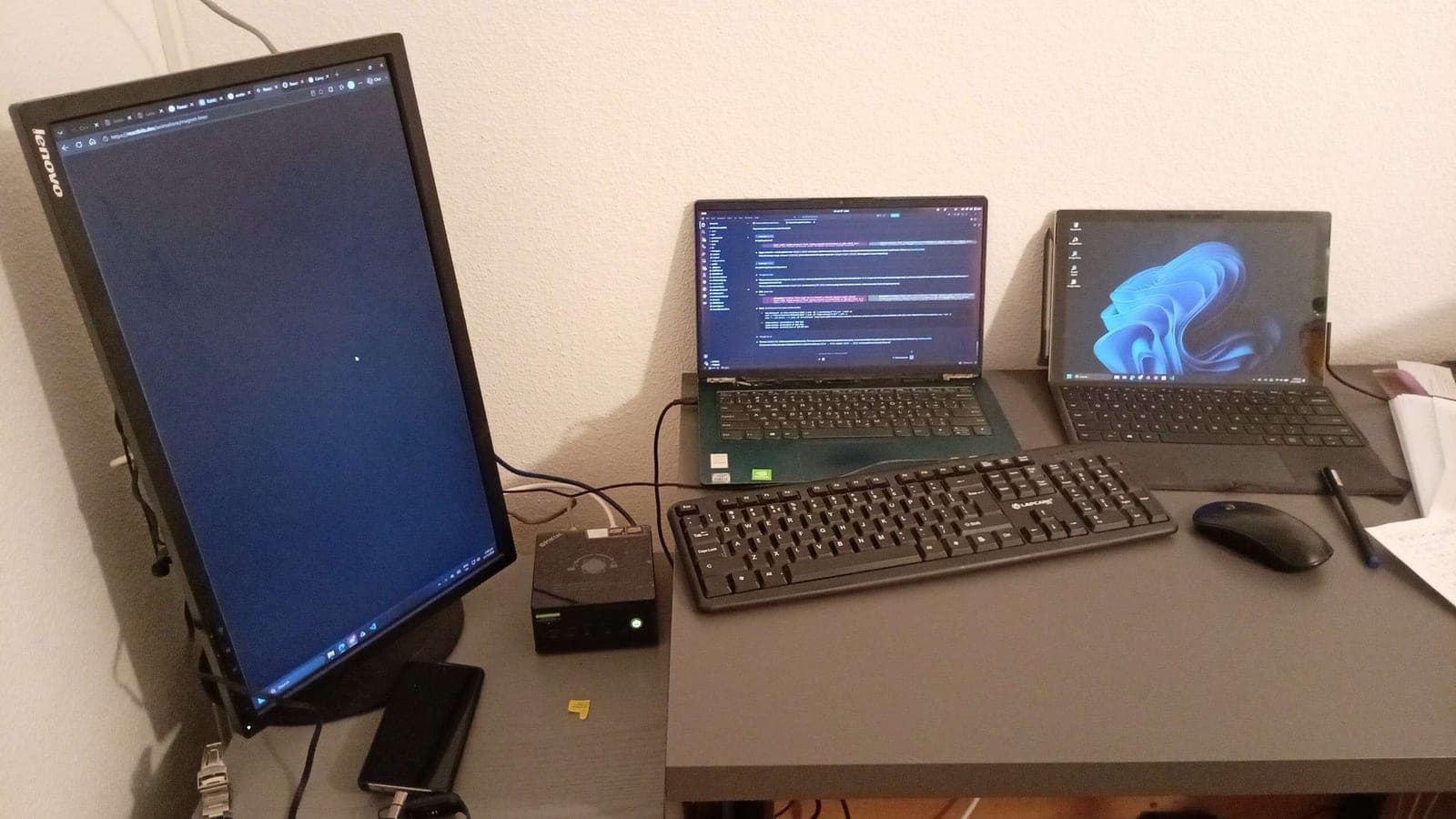
Three machines, one keyboard, one mouse.
- The K8 Plus is the brain. It drives the big Lenovo monitor on the left (rotated vertical, which is fantastic for reading code and docs) and does all the heavy lifting.
- The IdeaPad 5, damaged hinges and all, sits in the middle as a second screen. It runs Ubuntu. Once you can't carry a laptop anyway, it turns out to make a perfectly good extra display that you can also run things on natively.
- The Surface Pro 7 on the right is the actual portable machine now, for lectures and anywhere that isn't this desk.
The interesting part is not the hardware. It is the two pieces of software that make three separate computers feel like one workstation.
Tying it together: Tailscale
The first problem is reaching the mini PC when I am not sitting in front of it. I did not want to open ports on my router or mess with dynamic DNS. Tailscale solves this cleanly. It builds a small private network between your devices over WireGuard, so every machine gets a stable address that works whether I am at my desk or on the university network.
Install it on each machine, sign in with the same account, and they can all see each other. On Linux it is one line:
curl -fsSL https://tailscale.com/install.sh | sh
sudo tailscale up
Now, from the Surface or the IdeaPad, I can SSH into the K8 Plus from anywhere:
ssh kshitij@k8plusFor actual development I use VS Code's Remote SSH, which runs the whole editor
backend on the mini PC. The Node server, the database, the dev server, all of it
executes on the Ryzen chip. My portable machine just draws the UI. When I start a
frontend dev server on port 3000, VS Code forwards it back automatically and I
open localhost:3000 in the local browser as if it were running right there.
This is the part people miss about SSH-based workflows: you don't need to see the
remote desktop. The code runs there, the preview shows up here, and it feels
local.
Tying it together: Deskflow
The second problem is only relevant at the desk itself. I have three machines an arm's length apart and I did not want three keyboards. This is a software KVM problem, and the tool for it is Deskflow, the open-source project that Synergy and the old Barrier fork descend from. (Input Leap, the fork a lot of older guides still point you at, has gone quiet. Deskflow is the maintained one now.)
The model is simple. One machine is the server, the one with the physical keyboard and mouse, and the others are clients. The K8 Plus is my server since the keyboard and mouse are plugged into it. The IdeaPad and the Surface are clients. You lay out the screens in a grid in the server settings, and then your cursor just slides from one machine's display onto the next. Move the mouse off the right edge of the monitor and it appears on the IdeaPad. Keyboard focus follows it.
A few notes from setting it up:
- On Windows, grab the
.msiinstaller from the releases page. There is no plain.exe, which threw me for a second. - On my Ubuntu machine I installed it from the release package directly rather than apt, since it isn't in the default repos.
- Clipboard sharing works across all three, including between Windows and Linux. Copy a link on the IdeaPad, paste it on the K8 Plus. This only works reliably on X11, and my IdeaPad runs X11, so I was fine. If you are on Wayland, expect friction here and look at lan-mouse instead.
- Set a reserved IP for the server machine in your router, or the clients will lose it after a reboot. Then add Deskflow to startup on each machine and the whole thing reconnects itself when you power on.
Was the mini PC worth it after the repaste worked?
This is the question I kept asking myself, so I will answer it directly. Yes.
The repaste was still worth doing. It made the IdeaPad usable again and it is now a reliable second screen and SSH client instead of a machine that panicked during every call. But it was never going to close a five-year, four-core-versus-eight-core gap. Cooling was only ever half the story. The other half was the processor, and there is no thermal paste for being several generations behind.
What I ended up with, for roughly the price of one mid-range laptop, is a proper desktop workstation that stays cool under real load, a second screen I already owned, and a portable device for when I actually need to leave the desk. The three of them behave like one machine because Tailscale handles the distance and Deskflow handles the desk.
If you are staring at a laptop that overheats, start with the paste and the fans. Just be honest with yourself afterward about whether the chip was the real problem all along.